Lex: Source-Traced Compliance Values
Version 1.2.0
The Lex commands and the PayrollEngine.Lex library are available from Payroll Engine 1.2.0.
Version 1.1.0 contains only the LexSnapshot command.
Statutory values — tax rates, allowances, contribution ceilings, thresholds — are the most audited numbers of a payroll regulation. Lex records for every such value where it comes from, who confirmed it, and which version of the source was used, and keeps the regulation consistent with that record.
Contents
| Section | Description |
|---|---|
| Problem and Principle | Why compliance values need a traceable source |
| The .lex Folder | Manifest, snapshot and evidence files |
| The lex.json Manifest | Sources, values, files, exclusions, verification records |
| Source Formats | Web pages, PDF, spreadsheets and text documents are read automatically |
| Text Tables | Complete tariff tables taken from the authority text file |
| Lifecycle | From the source document to the regulation and the next cycle |
| Portable Automation | Command files, exit codes and CI gates |
| Library | PayrollEngine.Lex for custom tooling |
Problem and Principle
Data regulations hold the yearly statutory values in lookups. The values are typed in from official documents — PDFs, gazettes, web pages, spreadsheets. After a few update cycles, typical questions have no reliable answer:
- Where exactly does this rate come from, and which legal norm defines it?
- Was the value checked against the source, by whom, and when?
- Has the source document changed since the value was taken over?
- Is every statutory value of the regulation documented at all?
Lex answers these questions with one rule: every compliance-relevant value has a traceable, frozen source.
| Principle | Meaning |
|---|---|
| Lex first | A value enters the regulation only from lex.json (LexApply). The regulation follows the lex, never the other way around. |
| No value without entry | A regulation lookup value without lex entry is a finding (LexCheck). Deliberate gaps are documented as exclusions with a reason. |
| Frozen evidence | Source documents are stored next to the values; a snapshot records hashes of values, files and source texts. |
| Recorded verification | Each value carries a verification record — automatic (found by a tool in the source) or manual (confirmed by a person, optionally reviewed by a second person). |
| Files only | Lex works on the regulation files. Except the yearly rollover, no backend connection is required. |
The .lex Folder
A data regulation (in the command reference also called satellite) keeps its lex in a .lex folder next to the Regulation folder:
Data.Tax.2026/
├── .lex/
│   ├── lex.json                     # Manifest: sources, values, files, exclusions
│   ├── snapshot.json                # Generated by LexSnapshot, never edited
│   ├── calculation-guide-2026.pdf   # Evidence files
│   └── tax-rates-2026.html
└── Regulation/
    └── *.json                       # Regulation with lookups
| File | Maintained by | Content |
|---|---|---|
lex.json |
Regulator and Lex commands | The manifest: every compliance value with its source, location, legal reference, evidence and verification record |
snapshot.json |
LexSnapshot |
Immutable record: copies of the values, SHA-256 hashes and sizes of the evidence files, a hash over all values (sourceHash), and a hash of the normalized text of every readable source URL (liveSources) |
| Evidence files | LexFetch, LexSnapshot |
Unchanged copies of the source documents — after the snapshot, no external access is needed |
The .lex folder is committed together with the regulation. The evidence files must be tracked in version control; LexCheck reports evidence that is missing, untracked or ignored.
The lex.json Manifest
Root
{
  "$schema": "https://payrollengine.org/schemas/lex/v1.json",
  "authority": "XX",
  "regulation": "Data.Tax",
  "validFrom": "2026-01-01",
  "provider": "Tax authority",
  "languages": ["en"],
  "sources": [ ],
  "values": [ ],
  "files": [ ],
  "exclusions": [ ]
}
| Property | Required | Description |
|---|---|---|
authority |
Yes | Country or jurisdiction code |
regulation |
Yes | Regulation identifier |
validFrom |
Yes | Effective date YYYY-MM-DD; must match the validFrom of the regulation |
provider |
No | Issuing authority or data provider |
languages |
No | Languages the sources are written in (["de", "fr"]), see Languages; without it all available languages apply |
sources |
No | Document-level sources with legal basis and review rule |
values |
No | The compliance values |
files |
No | Evidence documents stored in the .lex folder |
exclusions |
No | Documented exceptions from the coverage, orphan and sourceLocation checks and from the automatic verification |
The full JSON schema is printed by LexSnapshot /schema.
Sources
"sources": [
  {
    "url": "https://example.org/tax/calculation-guide-2026.pdf",
    "description": "Calculation guide 2026",
    "legalBasis": "Income Tax Act §12",
    "review": "FourEyes"
  }
]
The review rule applies to all values listing this URL in sourceUrls: SingleAuthor (default) or FourEyes — a manual verification then requires a second person (reviewedBy, reviewedOn). When a value lists several sources, FourEyes applies if any of them requires it.
official marks the kind of source: true (default) for a publication of the authority, false for a secondary source such as a commercial summary, a tax calculator or an association page. A secondary source may help to find a value, but it should not be the main source (first URL in sourceUrls) of a released value: LexCheck reports a secondary main source as information, and as a finding with /release. Replace it with the official publication.
Values
Each value has a key and exactly one of content (inline scalar, JSON object or array) or contentFile (a file, e.g. a full tariff table).
"values": [
  {
    "key": "TaxParameter.AllowanceBasic",
    "content": "12000",
    "unit": "EUR",
    "sourceUrls": ["https://example.org/tax/calculation-guide-2026.pdf"],
    "sourceLocation": "Calculation guide 2026, Section 3.2.1",
    "legalReference": "Income Tax Act §12(1) sentence 2 no. 1",
    "documentRef": "calculation-guide-2026.pdf",
    "description": "Basic tax-free allowance"
  }
]
| Property | Description |
|---|---|
key |
Lookup.Key — the lookup name (with or without the regulation namespace) and the lookup value key |
content / contentFile |
The value as stated in the source, or a file containing the whole lookup |
contentMap |
Map that converts a text file in contentFile into lookup values, see Text Tables |
unit |
Unit of measure (EUR, %, ...); controls the percentage lookup of rates (see step 3) |
sourceUrls |
URLs of the sources, the main source first; each declared in sources[] |
sourceLocation |
Precise location: page, section, table, row |
sourceQuote |
Text passage of the source that contains the value, e.g. one and one-half times the regular rate; anchors the automatic verification (see step 3) and is part of the snapshot hash |
legalReference |
Legal norm defining the value |
documentRef |
Local evidence document of the main source; declared in files[] |
referenceYear |
Year the value legally belongs to when it differs from the cycle (e.g. a surcharge for 2025 in the 2026 data regulation); used for the year rating of the source lookup, part of the snapshot hash |
verification |
Verification record (see below) |
open |
true for a value taken over from the previous cycle and not yet verified again |
Several sources. A value whose numbers are spread over several documents — for example a rate published on a web page and its ceiling in a separate notice — lists all of them in sourceUrls. The source lookup counts a number as found when any of the sources holds it.
Local evidence. The local evidence of a value is its documentRef for the main source, and for each further source the file declared in files[] with the same URL. A file in the .lex folder that no value references in one of these ways is never read: its values count as without local evidence, and LexCheck lists the file as evidence file that backs no entry.
Mapping to the regulation. The entry above covers this lookup value of the regulation:
{
  "tenants": [
    {
      "identifier": "MyTenant",
      "regulations": [
        {
          "name": "Data.Tax",
          "validFrom": "2026-01-01T00:00:00.0Z",
          "lookups": [
            {
              "name": "TaxParameter",
              "values": [
                { "key": "AllowanceBasic", "value": "12000" }
              ]
            }
          ]
        }
      ]
    }
  ]
}
A further key part addresses a property of a value object (Lookup.Key.Property). An entry with contentFile covers its whole lookup; its key may end with the year of validFrom.
Verification Records
The verification record states how a value was confirmed:
"verification": {
  "mode": "auto",
  "verifiedOn": "2026-11-03",
  "method": "LexVerifySource 1.2.0; languages en 3f2a9c1b"
}
"verification": {
  "mode": "manual",
  "verifiedOn": "2026-11-03",
  "verifiedBy": "Jane Doe",
  "evidence": "calculation-guide-2026.pdf",
  "reviewedBy": "John Doe",
  "reviewedOn": "2026-11-04"
}
| Mode | Written by | Meaning |
|---|---|---|
auto |
LexVerifySource /writelocations |
A tool found all numbers of the value in the source with sufficient evidence (method: tool and version), or confirmed a text table by file identity (method: LexVerifySource 1.2.0; file identity) |
manual |
LexAttest |
A person confirmed the value against an evidence document (verifiedBy, evidence); with a FourEyes source also reviewed by a second person |
A manual record is never replaced by an automatic one. An automatic record lists the properties that are not taken from the source in derived (see the exclusion kind derived below). The record is part of the snapshot hash.
Files and Exclusions
"files": [
  {
    "fileName": "calculation-guide-2026.pdf",
    "sourceUrls": ["https://example.org/tax/calculation-guide-2026.pdf"],
    "description": "Calculation guide 2026"
  }
],
"exclusions": [
  {
    "kind": "coverage",
    "pattern": "TaxParameter.RoundingMode",
    "reason": "Technical setting, not a statutory value"
  }
]
A file is either downloaded by LexFetch, or copied by LexSnapshot from a local sourcePath (or downloaded from the first of its sourceUrls that answers).
Exclusions document deliberate exceptions instead of hiding them; they are listed in the check report with their reason:
| Kind | Excludes |
|---|---|
coverage |
Regulation values without lex entry |
orphan |
Lex entries without regulation value (e.g. a rule implemented in a script) |
sourceLocation |
Entries without sourceLocation |
autoVerification |
Entries that LexVerifySource never verifies automatically: no auto record and no location are written, the result shows excluded from auto verification: <reason>. For a value whose number is in the source but means something else; confirm it with LexAttest |
derived |
A property of an entry that is computed from other values and is in no source: LexVerifySource does not look up its numbers, verifies the other numbers of the entry and lists the property in the derived field of the auto record. The reason holds the formula and the legal reference |
notApplicable |
A property of a bundle entry with the value 0 because the rule does not apply (e.g. "DisabilityRate": 0 in a region without disability insurance). The reason says why. A zero property without this (or a derived) exclusion is reported as zero value without justification, so a rate set to 0 by mistake does not stay unnoticed |
The pattern is Lookup, Lookup.Key or a prefix with a trailing *. An autoVerification exclusion that matches no entry is reported by LexCheck.
A derived or notApplicable pattern addresses a property of an entry: the entry key followed by the property path of its JSON content (Lookup.Key.Property, nested properties separated by .). A pattern without property is invalid — to verify a whole entry manually, use autoVerification. LexCheck reports a derived exclusion whose property no longer exists, e.g. after a rename. Example of a bundle with one derived property:
"values": [
  {
    "key": "LevyParameters.2026",
    "content": "{\"WageBase\":9000,\"LevyRate\":0.04,\"StandardCredit\":0.032,\"CreditReduction\":0.002}",
    "unit": "mixed",
    "sourceUrls": ["https://example.org/levy/notice-2026.pdf"]
  }
],
"exclusions": [
  {
    "kind": "derived",
    "pattern": "LevyParameters.2026.CreditReduction",
    "reason": "5% of LevyRate (0.04), Levy Act §12(2)"
  }
]
Source Formats
Lex reads the content of a source in three places: the lookup of the entry numbers (LexVerifySource), the source text hash of the snapshot (LexSnapshot), and the detection of changed sources (LexCheck /checkurls). The format is detected from the content, not from the file extension:
| Format | Read as |
|---|---|
| HTML (web pages, also stored locally as evidence) | One section per document heading |
| Text, CSV | One section |
Spreadsheets: xls, xlsx, xlsb, ods |
One section per sheet |
| PDF with text layer | One section per page, plus the values of the form fields |
Text documents: docx, odt |
One section per heading; a table row is one line |
Spreadsheet numbers are read in invariant format and dates as serial numbers, so an xls and an xlsx version of the same workbook give the same text hash; at most 5000 rows per sheet are read. Further formats are added with custom readers of the library; a custom reader replaces the built-in reader of the same format.
A source is unreadable when the host blocks the request, the page builds its content with scripts only, or a PDF has no text layer (scanned document, no OCR) or is password protected. Other binary formats are not supported. For an unreadable source:
| Function | Effect |
|---|---|
LexVerifySource |
Reported as unreadable; no auto verification record |
LexSnapshot |
The file is stored and hashed, but the source gets no text hash |
LexCheck /checkurls |
A content change of the source cannot be detected |
LexCheck /release |
A value without manual record whose sources are unreadable live and that has no readable local evidence is a finding: verifiable neither locally nor live |
A value of an unreadable source therefore needs one of:
- a readable local copy — for example the page saved from the browser, or the text version of the document — stored in the
.lexfolder and referenced bydocumentRef; the value is then verified automatically against the copy, - a readable publication of the same values by the authority, added to
sourceUrls, or - a manual verification with
LexAttest; an unreadable document can still serve as its evidence (LexFetchdownloads it,LexSnapshotfreezes it with its file hash).
Languages
The source lookup reads the words around numbers and years — percent and scale words (pour cent, Mio.), connectors of year groups, validity phrases (gültig ab, effective), enactment citations and month names — from language files. Lex ships English, German, French, Spanish, Italian, Dutch and Portuguese. The manifest names the languages its sources are written in:
"languages": ["fr", "en"]
List the languages of the actual source documents, not the official languages of the country: a value published only in a Dutch decree needs ["nl"], an English guide added later extends the list. Without languages all available languages apply, so a new language file would change the results of every manifest without it. A further language is added with a language file in a folder passed to LexVerifySource (Vocabulary parameter, or the environment variable PAYROLL_ENGINE_LEX_VOCABULARY); a file with the language code of a shipped language replaces it. No new Lex version is needed. A language without language file stops LexVerifySource for the manifest. The auto record names the languages and the hash of their words, so every result can be reproduced and a changed word list renews the record.
Text Tables
Some authorities publish a complete tariff — tens of thousands of rows of income steps and rates — as a text file with fixed columns or tab-delimited, often in a ZIP archive with one file per region. Such a table is not retyped into the manifest: the authority file itself is the evidence, and Lex converts it into the lookup values of the regulation.
{
  "files": [
    { "fileName": "tariffs-2026.zip", "sourceUrls": ["https://example.org/tariffs-2026.zip"] }
  ],
  "values": [
    {
      "key": "TariffA",
      "contentFile": "tariffs-2026.zip!tariff-a26.txt",
      "contentMap": "tariff.map.json",
      "sourceUrls": ["https://example.org/tariffs-2026.zip"],
      "sourceLocation": "File tariff-a26.txt in tariffs-2026.zip, records 06 and 11",
      "legalReference": "Tariff ordinance, annex 1"
    }
  ]
}
| Property | Rule |
|---|---|
key |
The lookup name, optionally with an edition tag (TariffA.2026); the entry covers the whole lookup |
contentFile |
A text file in the .lex folder, or a file in a ZIP archive there: archive.zip!entry.txt. The archive entry is read in place, never extracted; the archive must be declared in files[] with its source URLs (LexFetch) |
contentMap |
The map — a JSON file next to lex.json — that turns a line into a lookup value |
The map names the columns of the lookup value; filters select the lines (e.g. the record types of the file), all filters must match:
{
  "filters": [ { "start": 0, "length": 2, "values": ["06", "11"] } ],
  "key":        { "valueType": "text",    "start": 6,  "length": 10 },
  "rangeValue": { "valueType": "decimal", "start": 24, "length": 9, "decimalPlaces": 2 },
  "values": [
    { "name": "Code",       "valueType": "text",    "start": 6,  "length": 10 },
    { "name": "MinimumTax", "valueType": "decimal", "start": 45, "length": 9, "decimalPlaces": 2 },
    { "name": "TaxRate",    "valueType": "decimal", "start": 54, "length": 5, "decimalPlaces": 4 }
  ]
}
| Map property | Content |
|---|---|
key or keys |
Lookup key, or the composite key written to the key values |
rangeValue |
Range value of a range lookup (optional) |
value or values |
Scalar value, or the named properties of the value object |
filters |
Line filters (optional): the trimmed column text must be one of values (case-sensitive) |
A field has valueType (text, decimal, integer, boolean), start (character index; column index for a tab-delimited line) and length (required for fixed columns). decimalPlaces divides the raw number by 10^n — implied decimals: 02300 with 4 places is 0.23. A line with a tab makes the file tab-delimited. Lines rejected by a filter — header, trailer, other record types — are skipped without warning; a line without key or value is reported.
How the commands treat a text table:
| Command | Behavior |
|---|---|
LexVerifySource |
Verifies by file identity: the archive is declared in files[] with source URLs and present in the .lex folder. No numbers are looked up and nothing is downloaded, also not with /live; the result counts file identity <n> |
LexSnapshot |
Hashes the table (for an archive entry its content) and the map; a changed map changes the snapshot |
LexApply |
Replaces all values of the lookup when the table differs, one value per line, and writes the lookup file as ZIP archive (see step 5) |
LexCheck |
Compares the table row by row — key, key values and range value; numbers numerically — and reports table <lookup> +added, -removed, ~changed; duplicate rows are a finding |
LexRollover |
Renames the year of the archive reference (tariffs-2026.zip!tariff-a26.txt → tariffs-2027.zip!tariff-a27.txt); declare and fetch the new archive |
Workflow for a new table. Create a placeholder lookup file in Regulation/ per table with the lookup name, description, attributes and empty values — LexApply writes only the values and keeps the rest. Check the column positions of the map on a few real lines of the file before the first run. Run LexApply /dryrun and compare the row count with the lines of the file minus header, trailer and filtered records; a second /dryrun after writing must report no table change.
The same map format is used by the Payroll Console command LookupTextImport, which imports a text table directly into the backend without Lex.
Lifecycle
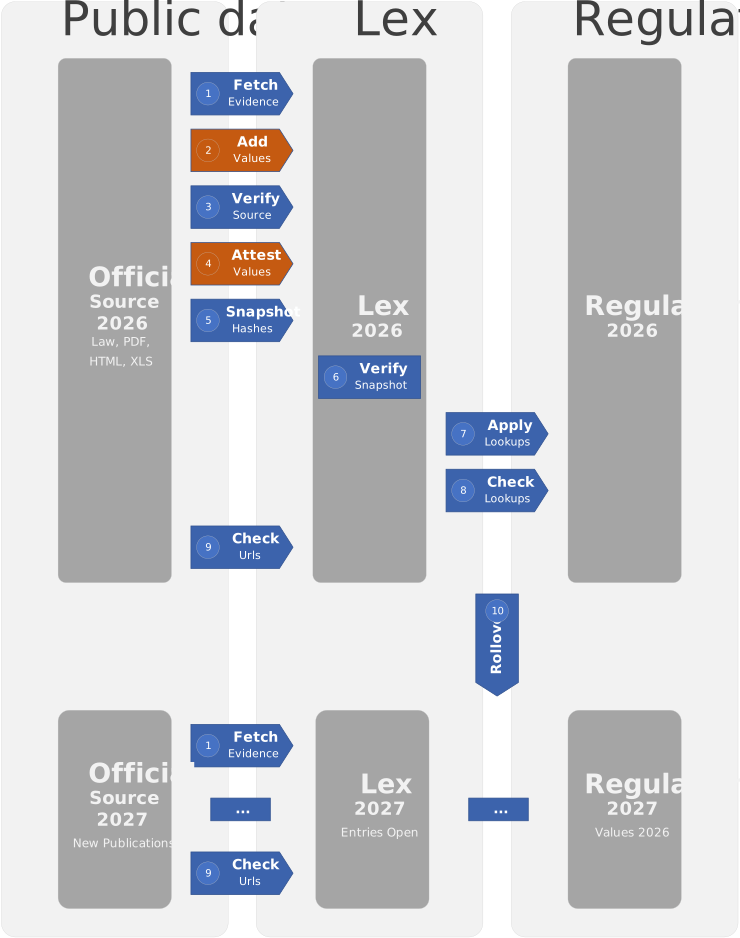
 Source document
       │  LexFetch            download into .lex, declare in files[]
       ▼
 lex.json entry
       │  LexAdd              key, content, source, location, legal reference
       ▼
 Verified entry
       │  LexVerifySource     auto: numbers found in the source
       │  LexAttest           manual: confirmed by a person (+ four-eyes review)
       ▼
 Frozen evidence
       │  LexSnapshot         snapshot.json with hashes
       ▼
 Regulation lookups
       │  LexApply            lex values → regulation
       ▼
 Consistency gate
       │  LexVerify           snapshot intact and current
       │  LexCheck            regulation, lex and evidence consistent
       ▼
 Next cycle
          LexRollover         new satellite from the payroll calendar, entries open
The editing commands (LexFetch, LexAdd, LexAttest) take the manifest with the Lex parameter (default: lex.json or .lex/lex.json in the current folder). The processing commands take a path or file mask of lex.json and process a whole repository tree with /recursive. The parameters below are a selection — see the command reference for the complete list.
1. Collect the Evidence — LexFetch
Downloads a source document unchanged into the .lex folder and declares it in files[]. An existing file with different content is only replaced with /overwrite.
LexFetch https://example.org/tax/calculation-guide-2026.pdf
LexFetch https://example.org/rates rates-2026.html Lex:Data.Tax.2026 "Description:Tax rates 2026"
2. Record the Value — LexAdd
Adds a new entry. The value is read from the source by a person; the command checks the format: the key must be new and have the form Lookup.Key, structured content must be valid JSON, every source URL must be declared in sources[] and the document in files[]. Several source URLs are separated by spaces. Missing fields are written empty and reported by LexCheck.
LexAdd TaxParameter.AllowanceBasic Content:12000 Unit:EUR SourceUrls:https://example.org/tax/calculation-guide-2026.pdf "SourceLocation:Section 3.2.1" "LegalReference:Income Tax Act §12(1)" DocumentRef:calculation-guide-2026.pdf
LexAdd only adds entries. To correct an existing value, edit it in lex.json and verify it again (step 3).
3. Verify the Value — LexVerifySource and LexAttest
LexVerifySource looks up the numbers of every entry in its sources:
| Toggle | Source |
|---|---|
/local (default) |
The local evidence file of each source URL — offline and reproducible |
/live |
Each URL of sourceUrls |
Inline content and JSON contentFile tables are checked; a table with more than 40 numbers is checked with 40 numbers evenly distributed over the table (sampled 40 of 2200 numbers). With several sources, a number counts as found when any source holds it. A text table is verified by file identity instead.
| Result | Meaning |
|---|---|
| Found | All numbers are in the source with sufficient evidence |
| Ambiguous | The numbers are in the source, but the evidence is weak (see below) — confirm with LexAttest or add sourceQuote |
| Partial / not found | Numbers are missing — review the value |
| Quote not found | The sourceQuote is in no readable source — correct the quote |
| Unreadable / no local evidence | Verify manually, see Source Formats |
| No numbers / no content | The entry holds no number, or its contentFile is missing or neither JSON nor a text table |
| File identity | A text table whose archive is declared with source URLs and present in the .lex folder |
Weak matches. A number found somewhere in a long document does not prove the value. The source lookup therefore rates a match as ambiguous when the entry is a single number and
- the source writes it with at most two digits, not counting separators (22%, 1.5, 50; a rate 0.012 found as 1.2%) — such numbers occur on almost every page, while 340, $4,300 or $8,600 are distinctive,
- the source writes it with at most three digits and it occurs in more than three sections (a long number like $12,900 may be repeated in examples and worksheets), or
- it is only found in words ($1 million, one and one-half, time and a half, 2.5 lakh) — the phrase may describe a different rule.
Year of the value. A number next to another year is weak evidence too: a table listing the rates of 2025 and 2026 holds both values. Each hit is rated by the closest year in its surroundings; the value year is referenceYear, otherwise the year of validFrom. A number found only next to other years is reported as multi-year section: add sourceQuote with the year. Validity phrases (effective January 1, 2025), year groups (2024 through 2026) and the tax years of a cycle that starts in the year (2025-26, FY 2025-26, assessment year 2026-27, assessment year commencing on the 1st day of April, 2026) are taken into account. In a tax year that does not start on 1 January a date counts for the tax year holding it: with a tax year from April, January 2026 belongs to the tax year 2025-26 and April 2026 to 2026-27. Citations of legal acts (Act of 20 December 2024) and print marks are not years of the value.
A rate below 1 is also looked up as percentage (0.085 as 8.5%) when the source writes %, percent or per cent directly after the number. Units that are no rate disable this: factor, hours, days and currency codes (USD, EUR); an empty unit, mixed or USD / rate allow it. A factor of 0.5 is therefore not found in "50 hours a week". A source that writes rates as percentages without percent sign — a rate table under a heading such as Tipos de cotización … 2,70 for 0.027 — is declared with the unit percent points (also percentage points): the value is then also looked up as the plain number. Such a hit proves that the number is in the table, not in which row; where the same rate occurs in many rows, bind the entry to its row with a sourceQuote. Tables with many numbers are not rated by these rules: the combination of numbers is the evidence.
sourceQuote resolves a weak match: the quote is normalized (whitespace, line-end hyphenation, typographic quotes) and must be in a section of the source, and the numbers of the entry must be in that section or in the quote itself. The result is found with this section as location — a factor 1.5 with the quote one and one-half times the regular rate is verified automatically. Where no unique quote exists (a value spread over a table, a value derived from the source), confirm the value with LexAttest instead. A value whose number is in the source but means something else is excluded with an autoVerification exclusion. A derived property of a bundle entry is documented with a derived exclusion (formula and legal reference) instead of confirming the whole entry manually: the other numbers of the entry are still verified automatically, and the report lists derived: <property> = <value> (<reason>).
With /writelocations the command sets missing sourceLocation values and writes an auto verification record for every found entry; ambiguous and excluded entries are never written. The written location names the evidence file and the section (rates-2026.pdf: Section "Page 24"). The location is built from the sections that hold most of the numbers, at most three sections per source; with several sources it names each source by its host, in the order of sourceUrls (irs.gov: Sections "Page 24", "Page 25"; ssa.gov: Section "Contribution and benefit base"). When a source would need more than three sections, or the location would be longer than 500 characters (location too long: set sourceLocation manually), no location is written — the verification record is. /refreshlocations also replaces locations previously written by the command, and keeps locations written by a person. With /strict partial, not found, quote not found and ambiguous entries give exit code 6.
LexVerifySource .lex/lex.json
LexVerifySource .lex/lex.json /live
LexVerifySource .lex/lex.json /writelocations
LexVerifySource lex.json /recursive /refreshlocations
Values that cannot be found automatically — scanned documents, script-only pages, derived values — are confirmed by a person with LexAttest. The evidence must be declared in files[] and exist in the .lex folder. The key accepts a pattern: Name matches all keys below it, Prefix* a prefix.
LexAttest TaxParameter "VerifiedBy:Jane Doe" Evidence:calculation-guide-2026.pdf
LexAttest TaxParameter.* "ReviewedBy:John Doe"
The second line records the four-eyes review of existing manual records. A manual record or review is only replaced with /overwrite.
4. Freeze the Evidence — LexSnapshot
Creates snapshot.json: all referenced files are copied into the .lex folder and hashed, and the normalized text of every readable source URL is hashed for later change detection (not for unreadable sources such as scanned PDFs or blocking hosts). An existing snapshot is skipped with an info message; after any change to the lex, regenerate it with /overwrite.
LexSnapshot .lex/lex.json /dryrun
LexSnapshot .lex/lex.json /overwrite
LexSnapshot lex.json /recursive
5. Write the Regulation — LexApply
Transfers the lex values into the lookup values of the regulation. Only differing values are replaced and missing values of an existing lookup are added; descriptions and formatting are kept, so a second run changes nothing. Open entries are skipped until they are verified.
LexApply .lex/lex.json /dryrun
LexApply lex.json /recursive
A text table replaces all values of its lookup when the table differs. A lookup file that holds lookups only — no wage types, collectors or cases — is then written as ZIP archive: Regulation/Lookups.TariffA.json becomes Regulation/Lookups.TariffA.zip with the entry Lookups.TariffA.json. A tariff of 12 MB JSON shrinks to about 0.6 MB. The archive is deterministic (entries in fixed order, fixed timestamp), so the same table gives the same bytes and version control sees no change. The output reports the replacement:
~ Lookups.TariffA.zip: TariffA (+98917 added, -0 removed, ~0 changed)
[ZIP] Lookups.TariffA.json -> Lookups.TariffA.zip: update installFiles (regulation-package.json), the project file and Setup.pecmd
Update the references of the regulation package by hand: the archive in installFiles of regulation-package.json, Regulation\**\*.zip as package item of the project file, and PayrollImport Regulation/Lookups.TariffA.zip /bulk in Setup.pecmd. The payroll import and the package installation read ZIP archives directly. A JSON file and an archive with the same name are an error, nothing is written. All Lex commands read the lookups inside Regulation/*.zip.
6. Check Consistency — LexVerify and LexCheck
LexVerify recomputes the hashes and confirms that snapshot.json is intact and current: it detects changed or missing evidence files, values edited after the snapshot, and a stale snapshot (exit code 6).
LexCheck compares each manifest with the lookup values of its regulation:
| Finding | Meaning |
|---|---|
| Without lex entry | A regulation value is covered by no lex entry |
| Orphan | A lex entry matches no regulation value |
| Value difference | Lex content and regulation value differ (numbers compared numerically); for a structured value the report counts all differing properties and names the first three |
| Table difference | A text table differs from its lookup: table <lookup> +added, -removed, ~changed; duplicate rows of the table |
| Reference year | Information: an entry whose referenceYear differs from the cycle |
| Missing fields | sourceUrls or legalReference empty; sourceLocation with /required |
| Location not entry-specific | With /required: the same sourceLocation longer than 200 characters on 5 or more entries, or a location longer than 500 characters (otherwise information) |
| Secondary main source | With /release: the main source is declared with official: false (otherwise information) |
| Manual verification required | With /release: an entry without manual record is ambiguous or its quote is not found, or it is excluded from auto verification but has an auto record |
| Verifiable neither locally nor live | With /release: an entry without manual record has no readable local evidence, and no source is readable live according to the snapshot |
| Zero value without justification | With /release (otherwise information): a bundle property with the value 0 without notApplicable (or derived) exclusion |
| Evidence file that backs no entry | With /release (otherwise information): a file that no entry references, or a file in .lex not declared in files[] |
| Evidence | A declared file is missing, untracked or ignored in git, or a verification evidence is not in the snapshot |
| Snapshot / validFrom | snapshot.json missing, or validFrom of lex and regulation differ |
| Verification | A FourEyes manual record without review; with /verificationrequired an entry without record |
| Open entry | A value taken over by LexRollover, to be verified again |
| Source URL | With /checkurls: source unreachable, or its text changed since the snapshot (hash comparison, not for unreadable sources) — check the value |
| Toggle | Effect |
|---|---|
/strict (default) |
Findings give exit code 4 |
/lenient |
Report only, exit code 0 |
/required |
A missing sourceLocation is a finding |
/verificationrequired |
An entry without verification record is a finding |
/checkurls |
Load every source URL and compare it with the snapshot |
/release |
Release gate: /required and /verificationrequired, a secondary main source is a finding, and the entries are verified against their local evidence — an ambiguous entry, an entry whose quote is not found and an entry that can be verified neither locally nor live need a manual record; zero values without justification and evidence files that back no entry are findings |
LexVerify lex.json /recursive
LexCheck .lex/lex.json
LexCheck lex.json /recursive /lenient Report:Reports/LexCheck.md
LexCheck lex.json /recursive /checkurls /verificationrequired
LexCheck lex.json /recursive /release Report:Reports/LexRelease.md
Release gate. Before a data regulation is released, run LexCheck /release: every value has a precise location and a verification record, every main source is official, no value relies on a weak automatic match, every value can be verified again against readable evidence, every zero value is justified, and every evidence file backs a value.
The Report parameter writes a Markdown report and a CSV file with the same name.
7. Next Cycle — LexRollover
Prepares the data regulation of the next cycle. The cycle containing Date is read from the payroll calendar of the tenant — this is the only Lex command that connects to the backend. The cycle start becomes the new validFrom, its year the new year tag.
LexRollover Data.Tax.2026 Date:2027-01-01 Tenant:MyTenant /dryrun
LexRollover Data.Tax.2026 Date:2027-07-01 Tenant:MyTenant Calendar:FiscalYear
The command creates a new folder and leaves the previous cycle unchanged:
- The folder is copied without build output and without
snapshot.json; evidence files are copied unchanged. - Year-tagged names and their references are renamed (a mid-year edition such as
Data.Tax.2026brolls toData.Tax.2027);validFromand the version are set, also in the lookup archives ofRegulation/*.zip. - The archive reference of a text table is renamed to the new year (
tariffs-2026.zip!tariff-a26.txt→tariffs-2027.zip!tariff-a27.txt); the old archive is kept under its name, declare the new archive infiles[]and fetch it withLexFetch. - Values are not changed. All entries become open: the verification record is removed until the value is verified against the new source.
referenceYearis kept. - Lines still mentioning the previous year are listed for review.
Afterwards, update the values and evidence for the new year, verify them (step 3), and run LexSnapshot, LexApply and LexCheck.
Portable Automation
All Lex steps are Payroll Console commands. They run the same way on Windows, Linux, macOS and in containers — no shell scripts are needed. Repeated sequences are stored in .pecmd command files.
A command file stops at the first command that returns an exit code other than 0 and returns that code. This turns a command file into a gate for a CI pipeline or a pre-release check.
Check gate — Lex.Check.pecmd in the repository root:
# verify the frozen evidence and the regulation against the lex
LexVerify lex.json /recursive
LexCheck lex.json /recursive Report:Reports/LexCheck.md
Update after editing — Lex.Update.pecmd with the parameter lex:
# refresh a data regulation after changing its lex.json
# argument lex: path of the lex.json
LexVerifySource $lex$ /writelocations
LexSnapshot $lex$ /overwrite
LexApply $lex$
LexVerify $lex$
LexCheck $lex$
PayrollConsole Lex.Update.pecmd lex:Data.Tax.2026/.lex/lex.json
PayrollConsole Lex.Check.pecmd
Command files run in their own folder by default; relative paths are resolved from the location of the
.pecmdfile.
| Exit code | Meaning |
|---|---|
0 |
Ok (or /lenient) |
2 |
Backend not reachable (LexRollover) |
3 |
Source not loaded (LexFetch) |
4 |
Findings (LexCheck /strict) |
6 |
Invalid input: lex.json missing or invalid, snapshot differs, evidence missing, target exists |
-1 |
Invalid parameters or error |
Library
The Lex commands are built on the PayrollEngine.Lex library (MIT; PDF sources are read with PdfPig, Excel workbooks with ExcelDataReader). It provides the manifest and snapshot model, the JSON schema and validation, the manifest editor, the snapshot writer and verifier, the checker, the source verifier, the text table reader (TextTable, TextTableMap, ContentSource for files and ZIP archive entries), the applier and the rollover — for custom tooling and integrations. Readers for further source formats are passed by file extension, and language files are loaded from a folder given by the caller; the library itself reads no environment variable or configuration.
dotnet add package PayrollEngine.Lex
See Also
- Payroll Console — command files and the Lex command group
- Lex command reference — all parameters and toggles
- Lookups — lookup types and data regulation patterns
- Regulation Design — versioning of data regulations
- Testing — case, payrun and report tests
- Compliance — audit trail and traceability