Technical Integration
Contents
| Section | Description |
|---|---|
| Whitebox API | Blackbox vs. Whitebox REST API — Scripting API concept |
| REST API | OpenAPI, technologies, list queries, attribute queries |
| .NET Client Integration | Client Services SDK |
| Report Integration | FastReport and custom IDocumentService |
| Webhooks | Workflow webhooks and scripting webhooks — when to use which |
| Database Integration | SQL Server and custom IDbContext |
| Logger Integration | Serilog and custom ILogger |
| Administration API | App control, report endpoints, backend information |
| Application Logs | Log files, payrun logs, report logs |
| Exchange Tools | Import, export, convert commands |
Whitebox API
The Payroll Engine is a Whitebox REST API with an additional interface—the Scripting API—through which runtime behavior can be influenced. The following diagram shows the difference between a conventional Blackbox REST API and the Payroll Engine Whitebox REST API:
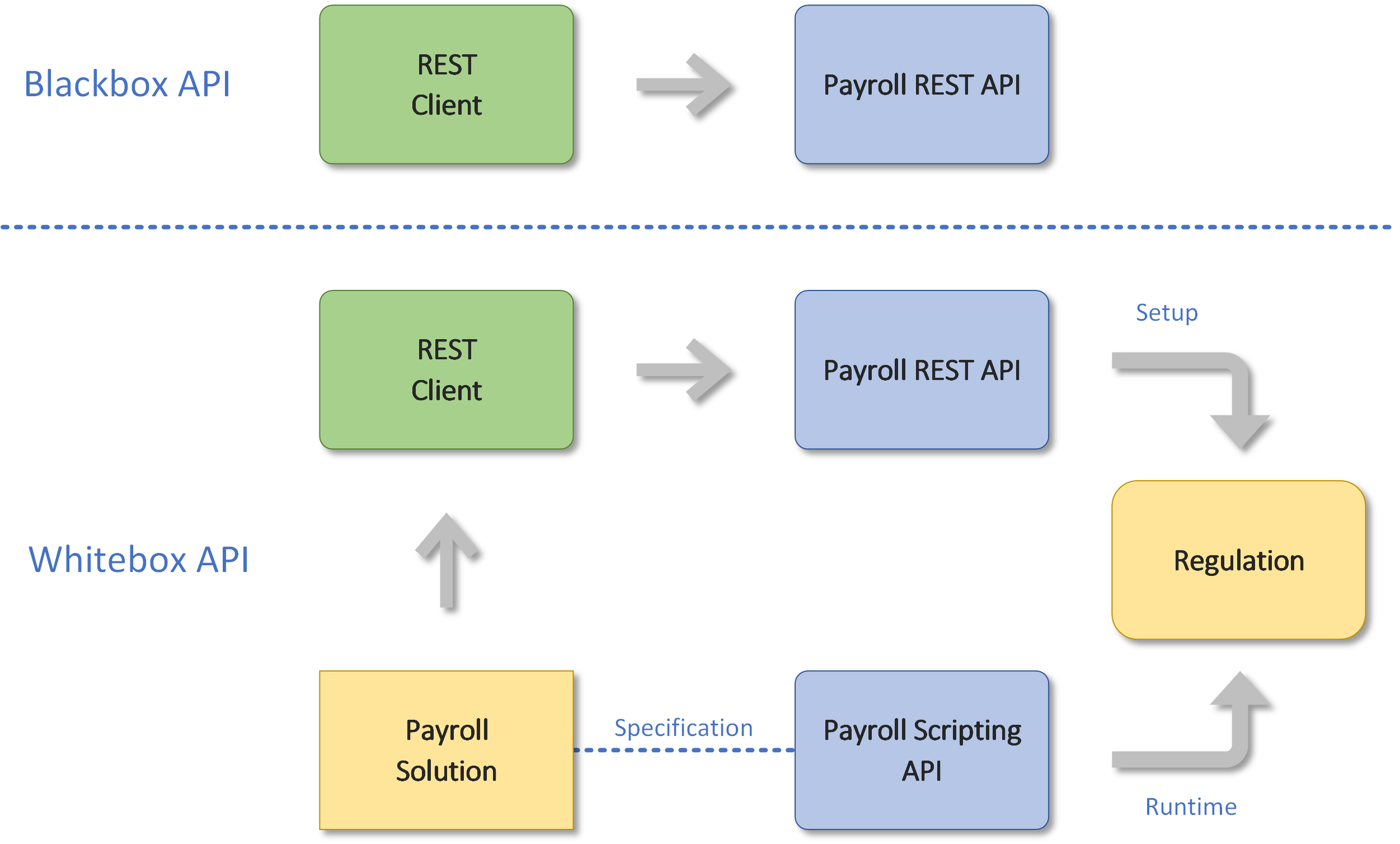
With a Blackbox API, the REST client communicates with the payroll REST API directly. The Whitebox API additionally allows a Payroll Solution to influence runtime behavior by providing C# scripts (Scripting API) that are compiled and executed by the backend at runtime.
REST API
The Payroll Engine is based on the open standard OpenAPI Specification and can be used by any REST-enabled client. The swagger.json file is included in the Release assets.
When running the Backend with
ASPNETCORE_ENVIRONMENT=Development(default in the Docker Compose setup), the Swagger UI is available athttp://localhost:5001/swagger. See Container Setup for details.
Technologies
The following technologies are used in the Payroll Backend:
| Component | Technology |
|---|---|
| REST API | OpenAPI 3.1 (OAS3.1), media type application/json |
| Authentication | None, API Key, or OAuth |
| Scripting API | C# 14 |
| Applications | .NET 10 |
| Database | SQL Server 2017 or newer |
| Development packages | NuGet Packages (GitHub Packages + NuGet.org) |
| Application packages | Docker Container (ghcr.io) |
See Security for authentication and authorization details. See Container Setup for Docker deployment.
List Queries
The following criteria can be used to restrict data in API list queries:
- Status filter for active or inactive objects
- OData filter expressions
- OData field ordering
- OData field selection
- Pagination with page size and offset
See API Usage for OData query syntax and examples.
Attribute Queries
The engine supports filtering, sorting and grouping of list queries by attribute values. The prefix in the attribute name determines the data type:
| Prefix | Data Type | Example |
|---|---|---|
TA_ |
Text | TA_MyName |
DA_ |
Date | DA_ProjectCreated |
NA_ |
Number | NA_SecurityLimit |
.NET Client Integration
.NET clients can use the Payroll Engine at code level with the Client SDK. Examples of the use of Client Services are the Payroll Console and the Web Application.
Report Integration
The Payroll Engine Clients are using by default the FastReport solution. To integrate another report engine, the IDocumentService interface from the payroll core project needs to be implemented.
Webhooks
PE provides two distinct webhook mechanisms. Choosing the correct one is important for payrun performance.
Payrun Workflow Webhooks
Workflow webhooks fire on payrun lifecycle events outside the per-employee calculation loop. They are suitable for operations with arbitrary or unknown latency, such as external authority APIs, digital signing services, or downstream system notifications.
| Event | Trigger | Track |
|---|---|---|
CaseFunctionRequest |
Case function request | — |
CaseValueAdded |
New case mutation | ✓ |
PayrunFunctionRequest |
Payrun function request | — |
PayrunJobStarted |
Statutory payrun job released for processing | ✓ |
PayrunJobCompleted |
Statutory payrun job completed | ✓ |
ReportFunctionRequest |
Report function request | — |
TaskChange |
Task change | — |
Typical use cases:
| Use case | Event |
|---|---|
| Submit payroll declaration XML (DmfA, Loonaangifte, SILTRA) | PayrunJobCompleted |
| Digital signing of payslips at fiscal authority (e.g. CFDI) | PayrunJobCompleted |
| Pre-validation or authority registration before processing | PayrunJobStarted |
| Downstream system notification (ERP, HR platform) | PayrunJobCompleted |
Webhook messages are sent via HTTP POST. The backend evaluates the HTTP status code and content (JSON) of the webhook response. Specific webhook messages are tracked and can be queried via the REST API.
The tutorial Webhook Consumer shows how Payroll Engine messages are forwarded to another service.
Scripting Webhooks
Scripting webhooks are invoked via InvokeWebhook inside a WageType or payrun script and execute synchronously within the per-employee calculation. Because they run inside the employee processing loop, latency has a direct multiplicative effect on total payrun duration:
Total overhead ≈ InvokeWebhook latency × number of employees
Important: Use scripting webhooks only for calls to local network services with consistently low and predictable latency. Never invoke external or internet-hosted APIs from a scripting webhook — use payrun workflow webhooks (
PayrunJobCompleted) for those.
Typical use cases:
| Use case | Notes |
|---|---|
| Local lookup microservice (e.g. sector-specific AT/EP rates) | Local network only |
| Internal calculation or validation service | Sub-millisecond target |
See Payrun Scripting for InvokeWebhook usage.
Database Integration
Currently the backend supports the SQL Server with about 65 tables, 40 stored procedures and 8 functions. To integrate other databases, the IDbContext interface from the backend project needs to be implemented.
Logger Integration
The Payroll Engine Clients are using by default the Serilog Logger solution. To integrate another logger, the ILogger interface from the payroll core project needs to be implemented.
Administration API
The Payroll API provides the following endpoints for system administration:
- Terminate the application
- Clear the application cache
- List available report endpoints (see Reports)
- Query backend server information
Backend Information
GET /api/admin/information returns a diagnostics and compatibility snapshot of the running backend. This endpoint does not require tenant authentication and is suitable for health checks, client compatibility verification, and support diagnostics.
Top-level fields:
| Field | Type | Description |
|---|---|---|
version |
string | Backend assembly version (e.g. 0.10.0-beta.1) |
buildDate |
DateTime | Backend assembly build date (UTC) |
apiVersion |
string | REST API version (e.g. 1.0) |
apiName |
string | REST API name |
authentication |
object | Authentication configuration — no secrets exposed |
database |
object | Database runtime information |
runtime |
object | Runtime configuration |
Application Logs
For system analysis, the engine logs certain events to log files that do not contain sensitive information. Log files are stored in the Windows system program data directory (%ProgramData%).
In addition to the application log, the following customer-specific logs are available:
- Payrun logs (see Payrun Scripting)
- Report logs (see Reports)
Exchange Tools
The Payroll Console provides the following commands for data exchange:
| Command | Description |
|---|---|
PayrollImport |
Import regulations, company and employee data (JSON, YAML) with zip-archive support |
RegulationExcelImport |
Import regulations from Excel workbooks (cases, wage types, lookups, reports, scripts) |
PayrollExport |
Export regulations, company and employee data selectively |
PayrollConvert |
Convert payroll files between JSON and YAML (supports file masks and recursive conversion) |
Report |
Data reports in XML, Excel and PDF |
DataReport |
Data reports in JSON |
See Client SDK for the complete list of Payroll Console commands.