Payroll Time Data
Time data is the central feature of the Payroll Engine. Most payroll systems implicitly assume that data is always processed in a live context — they have no concept of an Evaluation Date. This limits them to calculating what is valid right now, making forecasts and historical reconstructions complex workarounds rather than first-class operations.
The Payroll Engine separates three distinct time dimensions:
| Dimension | Description |
|---|---|
| Validity period | When a value is effectively active (e.g. a salary from March 1st) |
| System time | When the value was technically recorded in the system (Case Value Created Date) — immutable |
| Evaluation Date | The point in time from which the calculation is viewed |
This separation has significant practical consequences:
| Use case | How it works |
|---|---|
| Forecast | Set the Evaluation Date to a future period — calculate directly in the target period without computing all periods in between |
| Situation reconstruction | Set the Evaluation Date to the past — the exact data view from that moment is restored, based on the immutable Created Date of each case value |
| Retroactive recalculation | A mutation with a past start date automatically triggers recalculation of affected periods — no manual intervention required |
For the regulation author, this means: formulas are written for the target period. The engine resolves all time complexity in the background — period splits, overlaps, and retroactive mutations are handled transparently.
This time model has shaped the PE's storage design and retroactive calculation architecture throughout.
The Payroll Engine distinguishes between the following types of changeable data:
- Version controlled data
- Data model with data fields
- Input control with validation
- Wage calculation
- Report templates
- Third party data
- Time data
- Global case values
- Company case values
- Employee case values
Version Controlled Data is the data that is managed in the regulations. Changes to this data result in a new version of the regulation.
Time data refers to case values that describe the life cycle of company and employee data, providing additional time-related information. The following description shows how the case time data is structured and how it is used for wage calculation.
Read Travel-Through-Time-Data for a basic understanding of time data.
Case Time Data
With the help of the time data, all wage-relevant information of the employee is recorded as a case at the time of occurrence. In addition to the case value (e.g. wage, days of absence, etc.), the time data also contains the validity period of the case. The immediate change of personnel changes ensures that the data is always up-to-date and complete. On this basis, payroll runs are possible at any time. The validity period determines from when the value is to be valid and whether the change is limited in time.
This offers new possibilities for the display and management of case data:
- The validity period of the value can be limited: Input of the end date
- A case mutation can be relevant for future billing runs: Start date in the future
- A case mutation can be retroactive: Start date in the past (automatic retroactive billing)
- A case mutation can be retroactively reversed (automatic retroactive accounting)
- The evaluation date of the case data can be selected: What was valid then, what does the case data look like at the end of the year?
A conventional mutation corresponds to a case with a current start date and an open end date.
The following illustration shows the effect for the user in data entry.
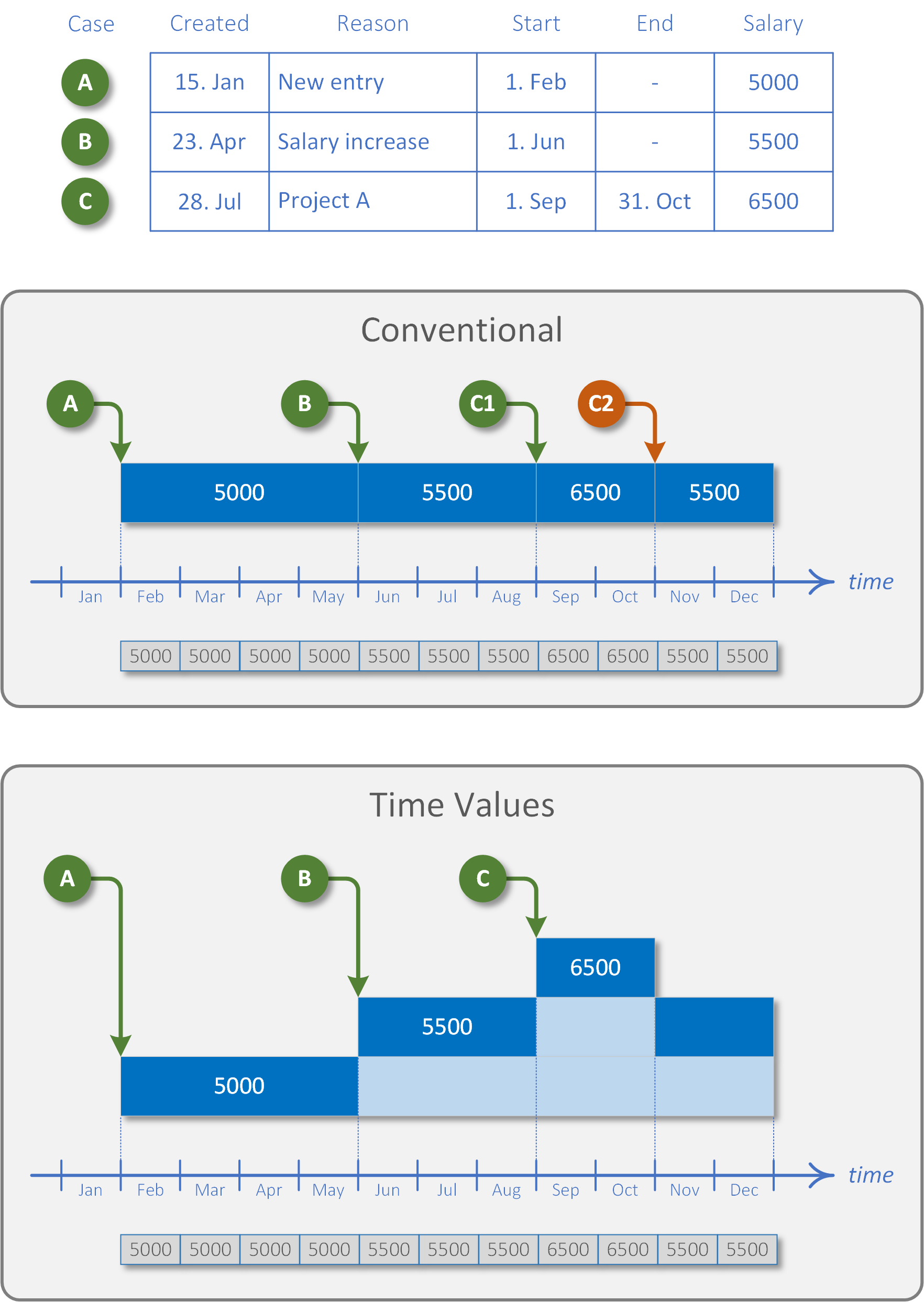
Time Types
| Type | Description | Period Start | Period End | # Period Values | Example |
|---|---|---|---|---|---|
Timeless |
Value without time commitment | - | - | 1 | Pension obligation |
Moment |
Value which is assigned to a point in time | x | - | 1..n 3) | Bonus |
Period |
Value assigned to a period | x | (x) 1) 2) | n 4) | Working hours |
Calendar Period |
Value distributed to the calendar period | x | (x) 1) 2) | n 4) | Monthly wage |
1) A period without end date indicates an endless/open period.
2) A mandatory closed period is achieved by means of scripting (validation) or case actions (SetFieldEndRequired, SetEndRequired).
3) Values are aggregated in the period (PeriodAggregation): Summary, first or last value.
4) Unlimited overlap support with splitting on a daily basis.
Cancel Time Values
To cancel invalid data and input errors, the invalid time value is adjusted and stored as a new time value that takes effect a fraction of a second later than the error time value. There are predefined cancellation modes for adjusting the cancellation value: keep, initialize, invert, or restore the value that was valid before the error occurred.
In case scripting, individual cancellation behavior can be defined using CaseChangeFunction.Cancellation and CaseChangeFunction.CancellationDate.
Time Calculations
The following example shows a scenario where the mutations of the monthly wage and risk bonus overlap.
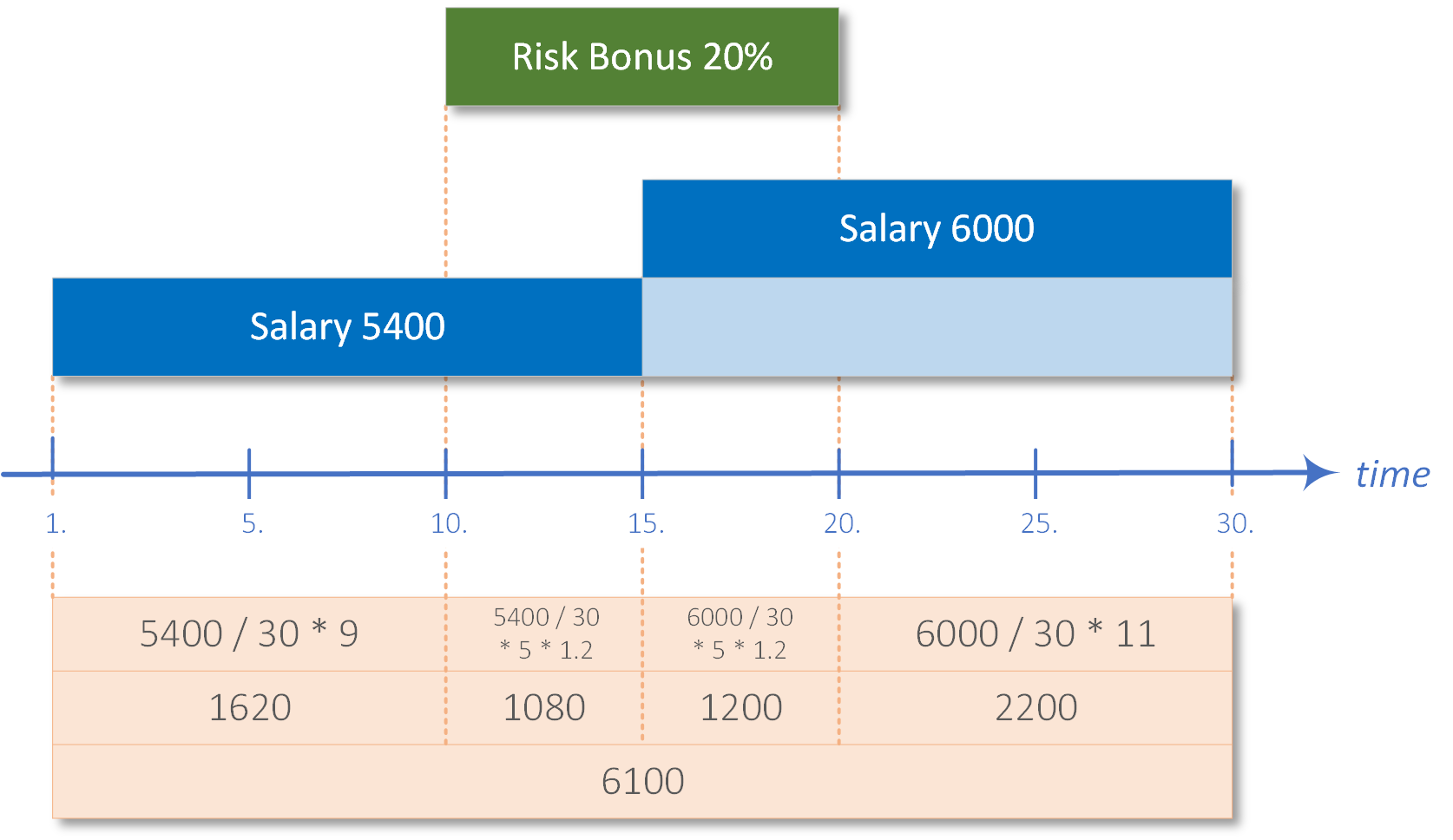
The calculation of time values taking into account overlaps is possible with the operators addition (+), subtraction (-), multiplication (*), division (/) and modulus (%).
The following wage type script calculates the above example.
1 var values = GetCaseValues("Salary", "RiskBonus");
2 decimal baseSalary = values["Salary"];
3 return baseSalary + (values["Salary"] * values["RiskBonus"]);
In line 1 the values to be calculated are requested — in this case Salary and RiskBonus. For more complex scenarios, the parameter list must be extended accordingly. Line 2 retrieves the base monthly salary, to which the risk bonus is added in line 3. The key is the multiplication operator, which splits the values into sub-periods and multiplies the values per sub-period. The final wage type result is the sum of the products across all partial periods.
The cast in line
2todecimalis required so that line3yields a numeric result.
Temporal Perspectives
The Payroll Engine separates two independent time axes for every case value lookup:
| Axis | Parameter | Question |
|---|---|---|
| Value Date | periodStart |
Which value is active at this point? |
| Evaluation Date | evaluationDate |
Which entries are visible (knowledge cutoff)? |
This two-axis model enables retroactive recalculation, historical reconstruction, and future forecasts — all without changing the underlying data.
Scenario
The following scenario is used throughout the examples below. Three salary entries are recorded over the course of a year:
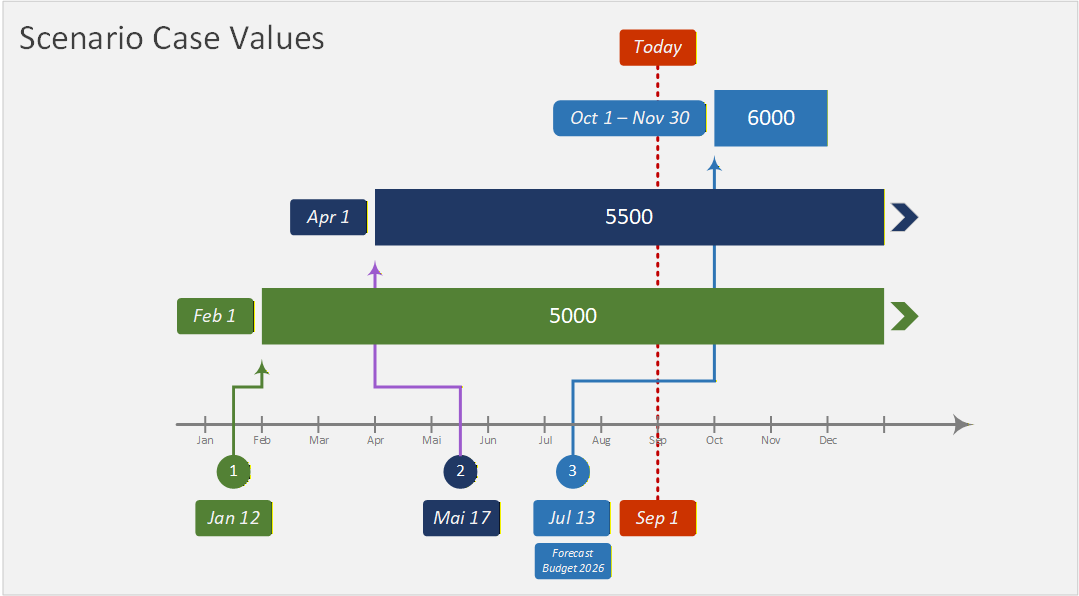
Retro Scenarios
With the Evaluation Date in the past, the engine reconstructs the exact data view that existed at that moment — based on the immutable Created timestamp of each case value.
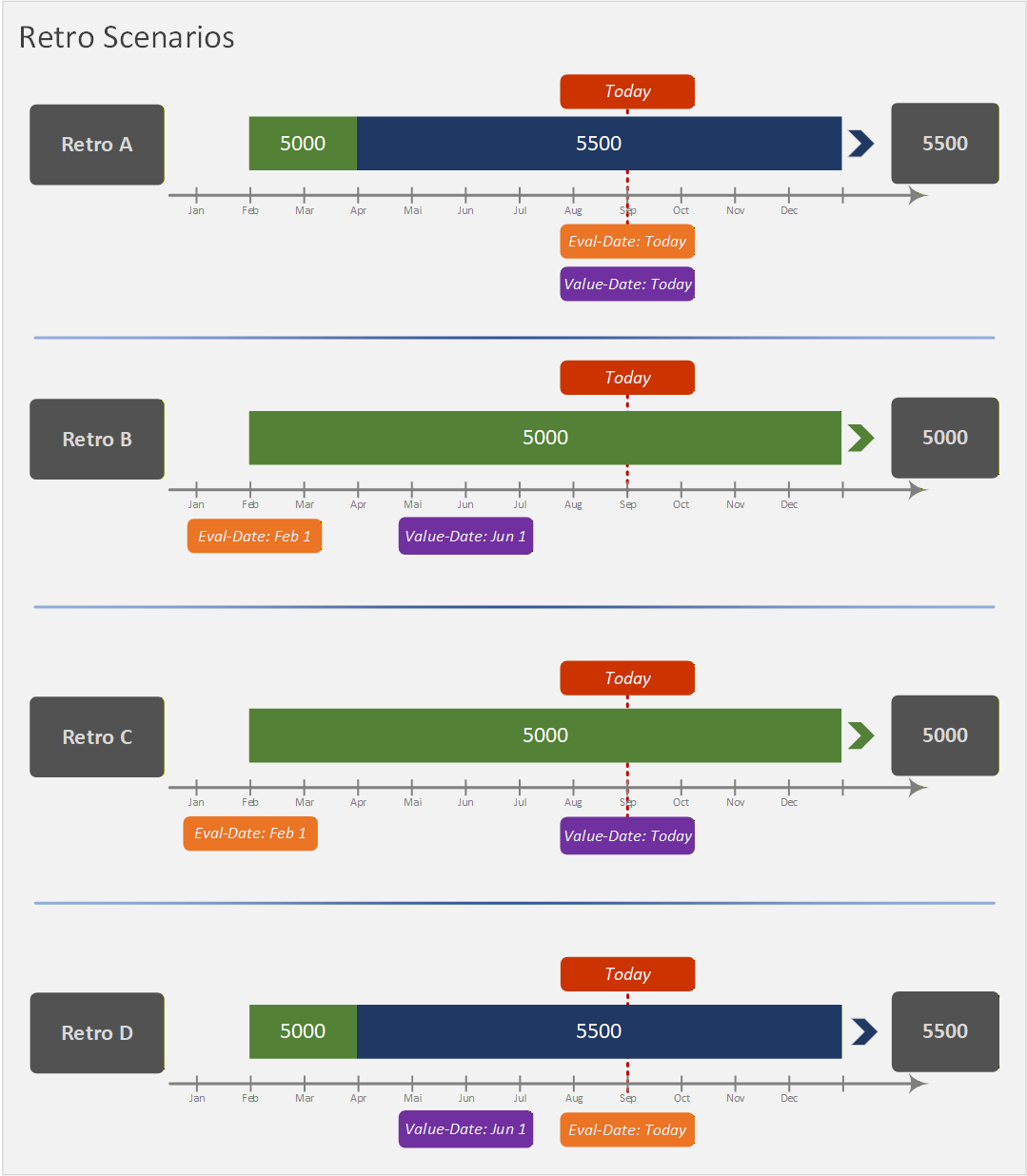
The four retro scenarios map onto a 2×2 matrix of Value Date × Evaluation Date:
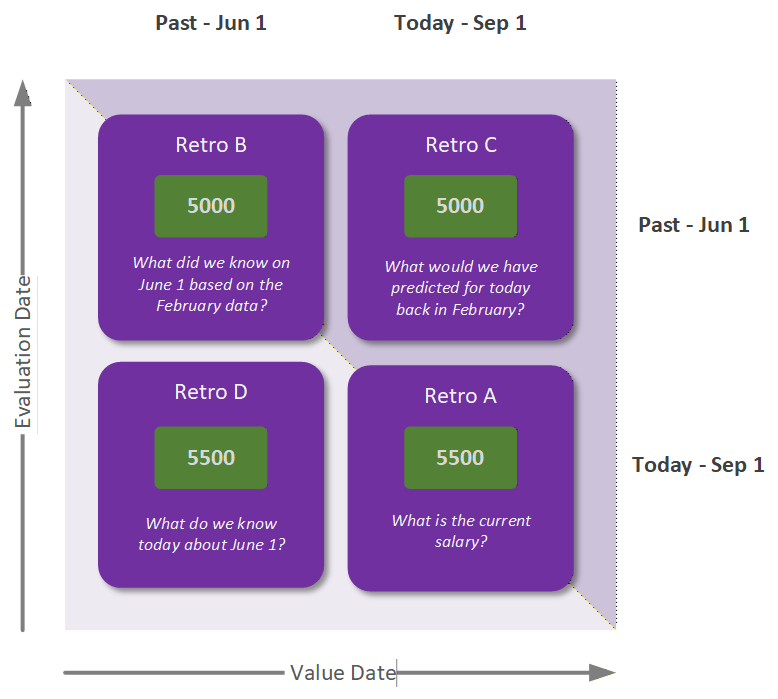
| Scenario | Eval Date | Value Date | Result | Question |
|---|---|---|---|---|
| Retro A | Today | Today | 5500 | What is the current salary? |
| Retro B | Feb 1 | Jun 1 | 5000 | What did we know on Jun 1 based on the February data? |
| Retro C | Feb 1 | Today | 5000 | What would we have predicted for today back in February? |
| Retro D | Today | Jun 1 | 5500 | What do we know today about Jun 1? |
Forecast Scenarios
With the Evaluation Date set to a future period, the engine calculates directly in the target month — without computing all intermediate periods. An optional forecast name isolates forecast results from live payroll data.
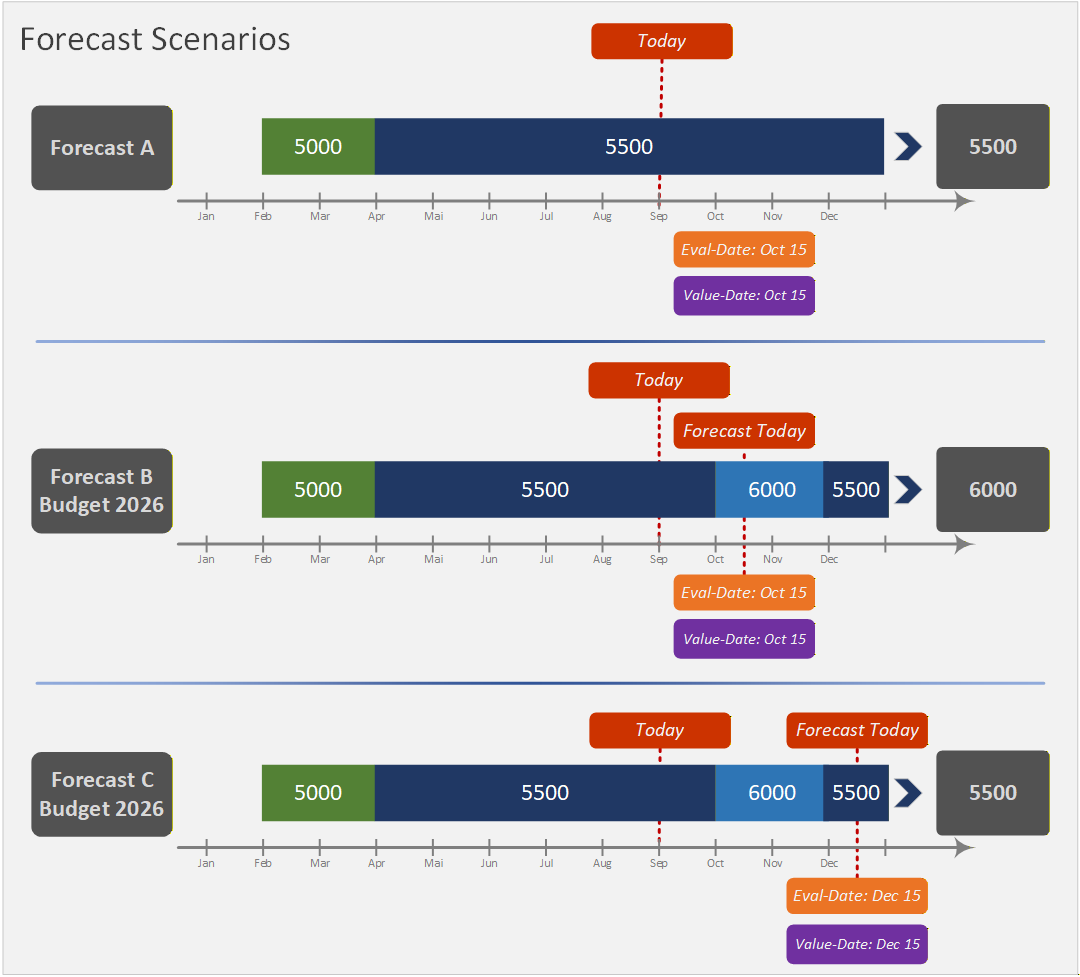
| Scenario | Eval Date | Value Date | Forecast | Result | Question |
|---|---|---|---|---|---|
| Forecast A | Oct 15 | Oct 15 | — | 5500 | What is the October salary without forecast? |
| Forecast B | Oct 15 | Oct 15 | Budget2026 | 6000 | What is the October salary including the budget plan? |
| Forecast C | Dec 15 | Dec 15 | Budget2026 | 5500 | What is the December salary after the budget entry expires? |
The TemporalPayroll example implements all seven scenarios as executable payrun jobs.