Job Lifecycle
Payrun Job
The payrun job starts the payrun for a pay period and stores the results in the payroll result. The underlying payroll uses the employee's division assignment to determine whether the employee is included.
A payrun job defines the purpose of execution:
- Statutory payroll run
- Forecast analysis for projections and scenario planning
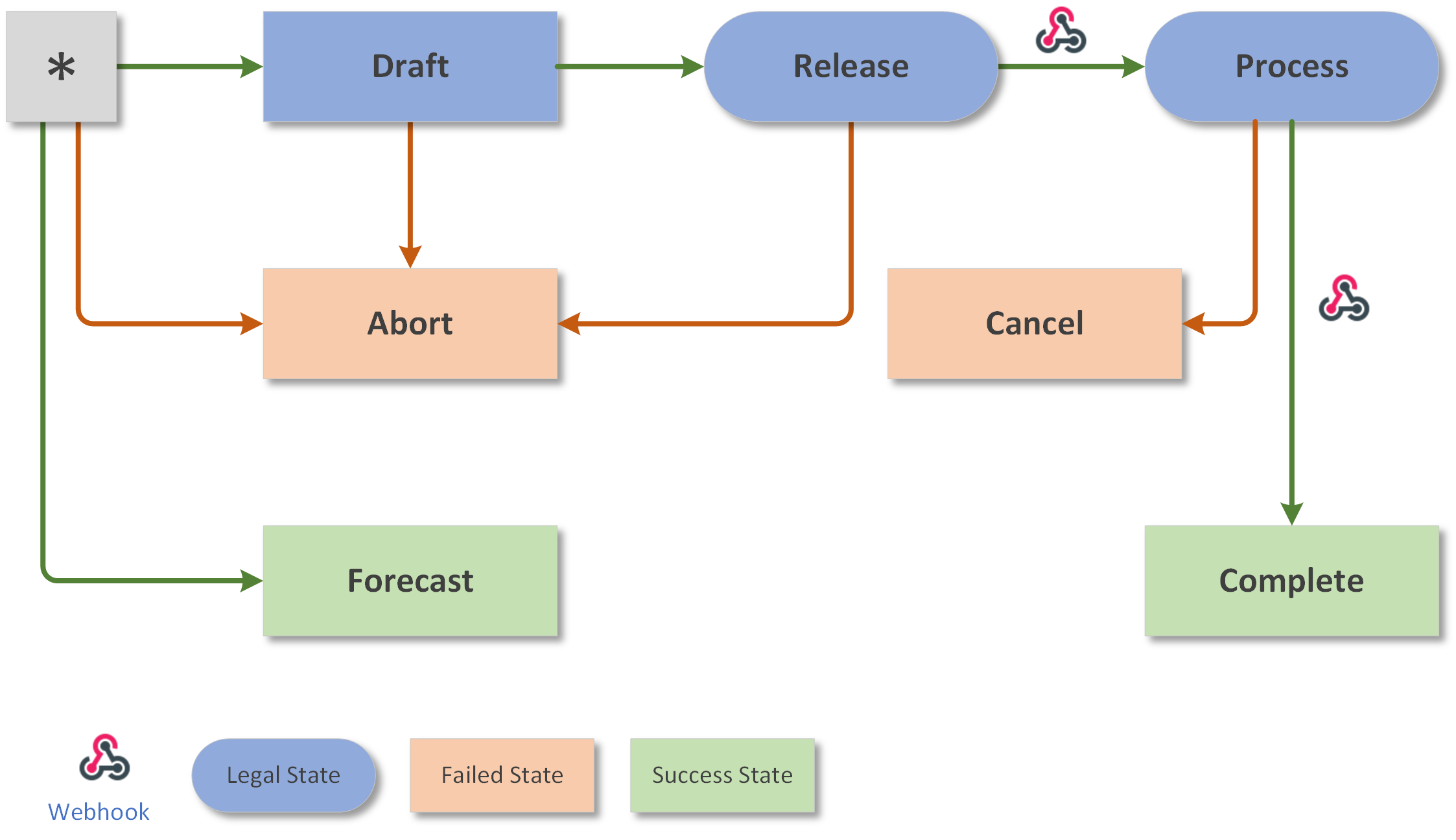
The payrun job is controlled by its job status:
| Job Status | Type | Description | Webhook |
|---|---|---|---|
* |
New payrun job | ||
Draft |
Working | Statutory payrun job for preview | |
Release |
Working | Statutory payrun job released for processing | |
Process |
Working | Statutory payrun job in processing | PayrunJobProcess |
Complete |
Final | Statutory payrun job successfully completed | PayrunJobFinish |
Forecast |
Final | Forecast payrun job | |
Abort |
Final | Statutory payrun job aborted before release | |
Cancel |
Final | Statutory payrun job failed during processing | PayrunJobFinish |
For statutory payruns, only one job in Draft status is allowed per payrun type
and pay period. Multiple jobs with Release or Process status are possible.
Forecast payruns can be executed any number of times.
Payrun Job Types
PayrollEngine supports three distinct payrun job types, each designed for a different stage of the payroll workflow.
| Aspect | Preview Job | Forecast Job | Legal Job |
|---|---|---|---|
| Use Cases | Pre-payroll validation, what-if, onboarding, testing | Budget planning, predictive analytics | Legally binding payroll calculation |
| Persistence | Non-persistent — API response only | Persistent — separate from legal results | Persistent — legally binding results |
| API Endpoint | POST .../payruns/jobs/preview |
POST .../payruns/jobs/start |
POST .../payruns/jobs/start |
| Endpoint Return | PayrollResultSet (synchronous) |
Payrun Job Id (asynchronous) | Payrun Job Id (asynchronous) |
| Invocation Identifier | — | Forecast name set |
Forecast field empty |
| Retro Pay | HTTP 422 if retro required | Full retro support (forecast scope) | Full retro support |
| Number of Employees | Exactly one | One or more | One or more |
| Job Status Start | — (no persisted job) | — | Draft |
| Job Status End | — (no persisted job) | Forecast (immediate) |
Complete (after approval process) |
| Jobs per Period | Unlimited | Unlimited | One active job at a time |
| Case Data | Legal and forecast case data | Forecast-specific case data | Legal case data |
| Visible in Reports | No | Yes (forecast reports) | Yes (legal reports) |
Legal jobs go through a multi-stage approval process. As long as this process is not completed, parallel legal jobs are not possible. Preview and forecast jobs have no such restriction.
Choosing the Right Job Type
Use a preview job when you need immediate calculation results for a single employee without any side effects — ideal for validation, testing, and interactive what-if scenarios in the UI.
Use a forecast job when you need to simulate payroll across multiple employees with persistent results that can be analyzed later — ideal for budget planning and business case evaluation.
Use a legal job for the actual, legally binding payroll run that produces the official payslip results.
See Payrun Job Preview below for detailed scenarios and examples. See Forecasts for forecast-specific workflows.
Payrun Job Invocation
The PayrunJobInvocation uses name-based references to identify the payrun and
the executing user:
| Field | Description |
|---|---|
PayrunName |
Name of the payrun to execute |
UserIdentifier |
Identifier of the executing user |
Breaking Change (v0.9.0-beta18): The previous id-based properties
PayrunIdandUserIdhave been removed. Existing integrations must switch toPayrunNameandUserIdentifier.
Payrun Job Preview
The preview API executes a payrun for a single employee and returns the calculation results without persisting anything to the database. This is useful for several real-world scenarios where you need to see payroll results before committing them.
Business Scenarios
Pre-Payroll Validation
Before running the official monthly payroll, HR can preview each employee's payslip to verify that recent case changes (salary adjustments, employment level changes, new bonuses) produce the expected results. If something looks wrong, the data can be corrected before the actual payrun.
What-If Simulation
Managers planning a salary increase or a change in employment level can preview the impact on gross and net pay, social insurance contributions, and withholding tax — without creating draft payrun jobs or polluting the payroll history.
Onboarding Verification
When setting up a new employee with their initial case values (monthly wage, employment level, location, etc.), the preview confirms that all wage types calculate correctly before the first real payrun.
Automated Testing
Preview enables fast, side-effect-free payrun tests in CI/CD pipelines. Tests run against the preview endpoint, verify results, and leave the database untouched. See Payroll Testing for details.
API Endpoint
The preview endpoint is synchronous and returns the complete PayrollResultSet in
the response body:
POST /api/tenants/{tenantId}/payruns/jobs/preview
The request body is a standard PayrunJobInvocation with exactly one employee identifier.
Restrictions
Preview mode has two important limitations:
-
No retro pay calculation. Preview accepts any
RetroPayMode(including the defaultValueChange) to match production behavior. If retroactive calculation is actually triggered during processing, the endpoint returns HTTP 422 Unprocessable Entity with a descriptive error message including the employee identifier and retro date. -
No historical result queries. Wage type expressions that query persisted results from prior periods will only find results from previously persisted payrun jobs — not from earlier preview invocations within the same test run.
Example
The following example demonstrates a preview test with monthly wage, hourly wage, bonus, age supplement, withholding tax, and special bonus calculations.
Payroll Setup
| Wage Type | Name | Expression | Collectors |
|---|---|---|---|
101 |
MonthlyWage | MonthlyWage × EmploymentLevel |
SocialInsurance, TaxBase |
101.1 |
MonthlyWage.Credit | MonthlyWage × 5% |
Credit |
101.2 |
MonthlyWage.Debit | MonthlyWage × −5% |
Debit |
102 |
HourlyWage | NumberOfHours × HourlyWage |
SocialInsurance, TaxBase |
103 |
Bonus | Bonus case value |
SocialInsurance, TaxBase |
106 |
AgeSupplement | Age ≥ 50 ? MonthlyWage × 7.5% : 0 |
— |
206 |
WithholdingTax | TaxBase × lookup(WithholdingTax) |
— |
207 |
SpecialBonus | WageType[101] × rangeLookup(SpecialBonus, WageType[101]) |
— |
Expected Results
| Period | WT 101 | WT 102 | WT 103 | WT 106 | WT 206 | WT 207 | SocialIns | TaxBase |
|---|---|---|---|---|---|---|---|---|
| Jan 19 | 2'500 | 275 | 99'999 | 0 | 5'138.70 | 125 | 102'774 | 102'774 |
| Feb 19 | 2'925 | 125 | 0 | 0 | 152.50 | 146.25 | 3'050 | 3'050 |
| Mar 19 | 3'000 | 0 | 0 | 0 | 150.00 | 90 | 3'000 | 3'000 |
| Apr 19 | 3'000 | 0 | 5'555 | 0 | 427.75 | 90 | 8'555 | 8'555 |
| May 19 | 3'000 | 562.5 | 0 | 450 | 178.13 | 90 | 3'562.5 | 3'562.5 |
| Dec 19 | 3'000 | 0 | 0 | 450 | 240.00 | 90 | 3'000 | 3'000 |
| Jan 20 | 3'000 | 0 | 0 | 450 | 240.00 | 90 | 3'000 | 3'000 |
Running the Preview Test
PayrunEmployeePreviewTest Test.et.json
PayrunEmployeePreviewTest Test.et.json /showall
See Payroll Testing for all available test methods.
See Also
- Payrun Overview
- Execution — async processing, retro triggers
- Forecasts
- Retro Corrections