Execution
Asynchronous Payrun Job Processing
For large payrolls (500+ employees), the payrun job endpoint supports asynchronous
processing via a background queue. The endpoint returns HTTP 202 Accepted immediately
with a Location header for status polling, preventing HTTP timeout errors during
long-running payroll calculations.
The processing pipeline:
- The payrun job is pre-created and persisted with status
Process. - The job is enqueued into a bounded channel (capacity: 100) for backpressure control.
- A background worker dequeues and processes jobs sequentially.
- On completion or abort, a webhook notification is sent (
PayrunJobFinish).
If the background service encounters an unhandled exception or shuts down, running jobs are aborted and the webhook is triggered with the abort status.
Client polling pattern:
POST /api/tenants/{tenantId}/payruns/jobs
→ HTTP 202 Accepted
Location: /api/tenants/{tenantId}/payruns/jobs/{jobId}
Breaking Change (v0.9.0-beta14): This endpoint returns HTTP 202 instead of HTTP 201. Clients must poll the status endpoint to determine job completion.
Parallel Employee Processing
The payrun can process employees in parallel to reduce total execution time.
The MaxParallelEmployees setting controls the degree of parallelism:
| Value | Behavior |
|---|---|
0 or off |
Sequential processing (default) |
half |
Half of available CPU cores |
max |
All available CPU cores |
-1 |
Automatic (runtime decides) |
1–N |
Explicit thread count |
Each employee is processed within an isolated PayrunEmployeeScope that provides
mutable state isolation. Progress reporting is thread-safe with batched database
persistence (every 10 employees). The payroll calculator cache uses Lazy<T> with
a composite key (calendar + culture) for thread-safe reuse across employees.
Sequential processing remains the default for deterministic behavior. Enable parallel processing only after verifying that your regulation scripts do not share mutable state across employees.
Payrun Restart
During the payrun, all wage types are processed in the order of their wage type numbers. In special cases, the payrun can be restarted for an individual employee. Each run is identified in the wage type by a run counter. Runtime values (see Payrun Scripting) can be used to exchange data between runs.
See Testing for how to verify payrun behavior with automated tests.
Incremental Payrun
When multiple payruns are executed within a single period, the engine stores only incremental results — values that have changed since the last payrun. The REST API provides dedicated endpoints to retrieve the currently valid (consolidated) results for a pay period.
Retroactive Calculation
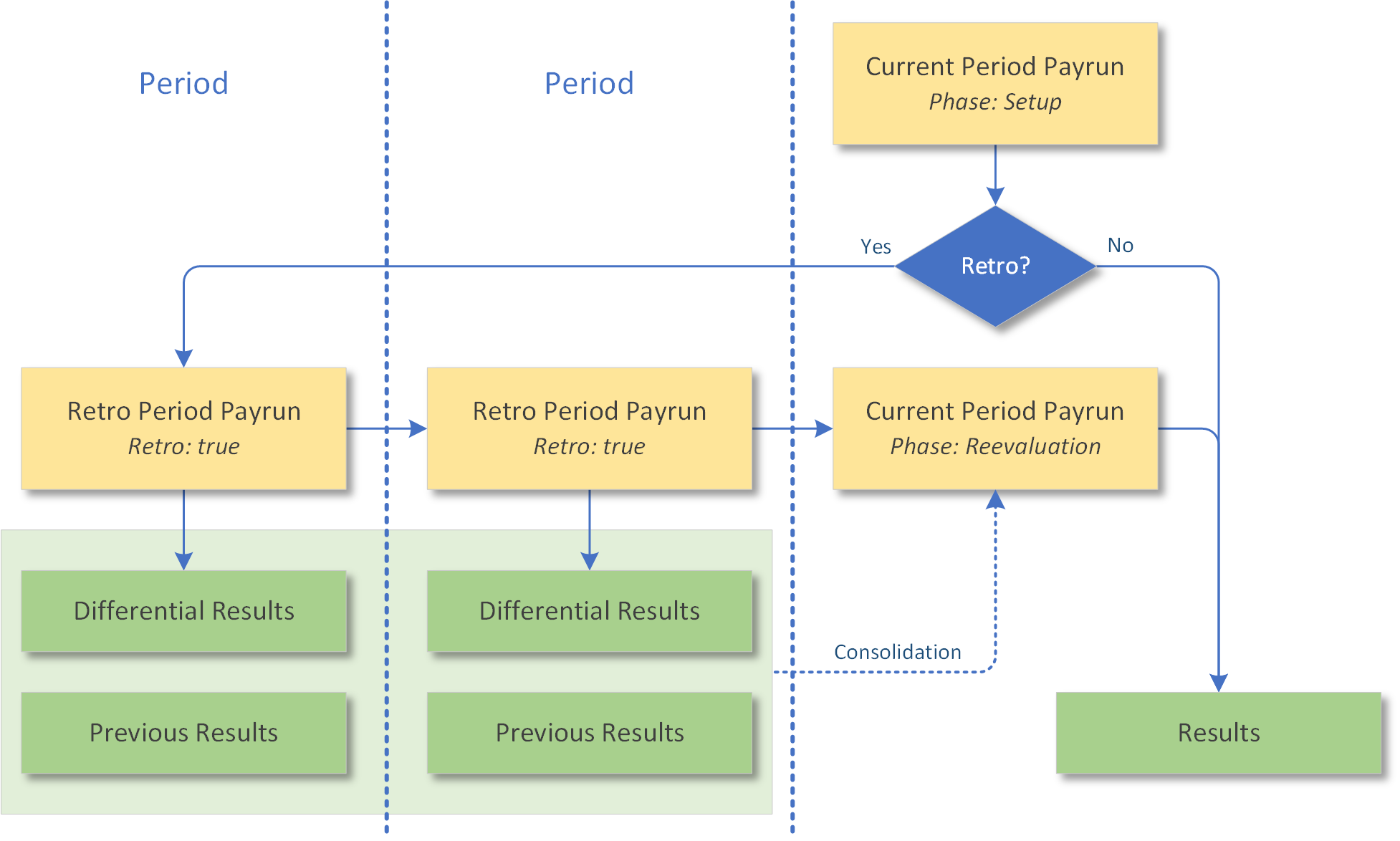
Retroactive calculations are triggered automatically when mutations have occurred after the last payrun that affect prior pay periods.
The retroactive calculation steps are:
- Calculate the current pay period (accounting for mutations into prior periods) — Execution phase: Setup — results are transient
- Calculate all affected prior periods, starting from the earliest mutation period — Store incremental results for each prior period
- Recalculate the current pay period — Execution phase: Reevaluation — Consolidated results include prior retroactive results — Store final results
For forecasts, prior runs with the same forecast name apply. The number of retroactive periods is unlimited; however, retroactive calculation can be restricted to the current payroll cycle.
Retro Period Limit
The MaxRetroPayrunPeriods setting (default: 0/unlimited) provides a safety guard
against runaway retroactive calculations with RetroTimeType.Anytime. When a positive
value is set, the engine limits the number of retroactive periods processed per
payrun job.
Manual Retroactive Calculation
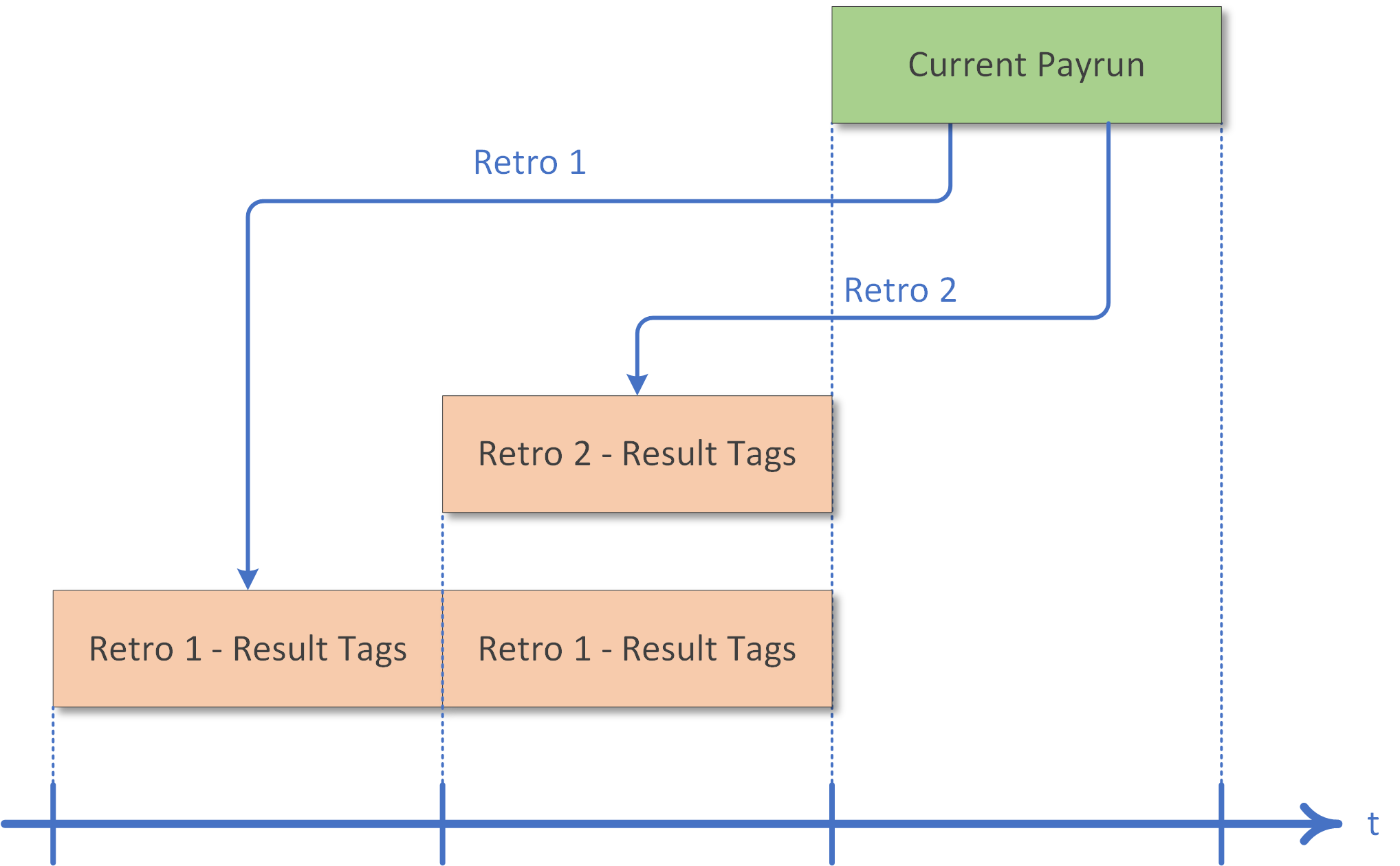
In addition to automatic retroactive calculation, a retroactive payrun can also be triggered manually via scripts. Results generated during retroactive calculation are tagged with Payroll Result Tags, which can be used as filter criteria when querying payroll results.
The following scenario shows a current-period payrun triggering two retroactive payruns:
For how retro corrections appear on payslips and how to compute
RetroValuein a report, see Retro Corrections.
Employee Processing Timing
When LogEmployeeTiming is enabled, the engine logs per-employee processing duration
and a summary (processing mode, total time, average time per employee) at the
Information log level. This is useful for identifying slow employees and tuning
payrun performance.
Processing Pipeline Logging
The payrun processor uses a three-tier logging strategy to balance multi-job monitoring with detailed diagnostics.
| Log Level | Content | Use Case |
|---|---|---|
Information |
Start and completion summary per job (payrun name, tenant, job id, status, employee count, total duration) | Multi-job monitoring — 2 lines per job |
Debug |
Job creation/update confirmations in StartJobAsync |
State change tracking |
Trace |
Phase 1–7 entry and completion with per-phase timing, context details | Single-job diagnostics |
Error |
Job abort with job id and reason | All levels |
All log messages include a [Preview] prefix when running in preview mode, and a
[retro] tag on the start message when processing a retroactive job. The job id
is included in all messages from Phase 2 onward.
To enable detailed phase logging for a specific job, set the LogLevel on the
PayrunJobInvocation to Verbose.
Enabling Trace Logging in Deployment
"Serilog": {
  "MinimumLevel": {
    "Default": "Information",
    "Override": {
      "System": "Warning",
      "Microsoft": "Warning",
      "PayrollEngine.Domain.Application": "Verbose"
    }
  }
}
Remove the override after diagnostics are complete to avoid excessive log volume in production.
See Also
- Payrun Overview
- Job Lifecycle — job types, status, invocation
- Retro Corrections — correction values in reports
- Best Practices: Retro & Forecasts
- Performance